Viral Manager for creator agencies
Your creators already know how to make content. What costs an agency is finding the formats worth making, briefing ten people on them, and proving at the end of the month that it worked. Viral Manager sits between those three.
7-day free trial, cancel anytime
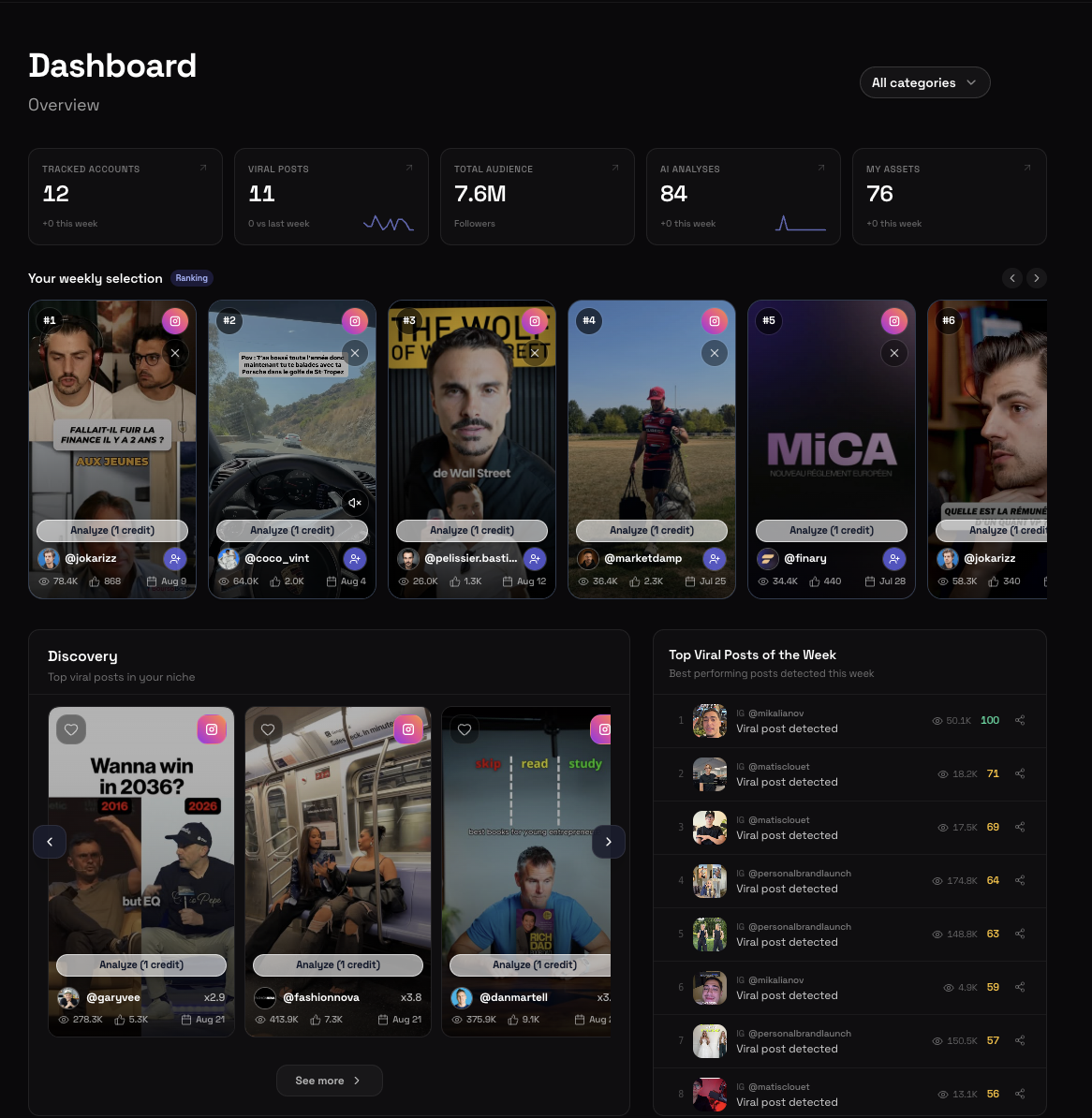
Find the format before your client's competitor does
Discovery watches the accounts that matter in every niche you manage and surfaces the posts that beat their own averages, category by category. One feed instead of four scrolling sessions, and it still holds when you go from four niches to twelve. Detection compares each account to itself, so a format that works at fifty thousand followers surfaces next to one that works at two million.
 94/100 Analysis completed
 @kayla_itsinesx4.2 412K 38K 4 Sep
 91/100Analyze
 @kendalltoolex3.8 301K 24K 6 Sep
 88/100Analyze
 @matildadjerfx3.1 288K 31K 7 Sep
 86/100 Analysis completed
 @melrobbinsx2.9 264K 19K 8 Sep
 84/100Analyze
 @justcocox2.8 198K 14K 9 Sep
 82/100Analyze
 @weworewhatx2.6 176K 12K 9 Sep
 79/100 Analysis completed
 @chontelduncanx2.3 152K 11K 10 Sep
 77/100Analyze
 @justine_snacksx2.1 141K 9.8K 11 Sep
 74/100Analyze
 @marissamcnamarax1.9 118K 8.4K 11 Sep
 71/100Analyze
 @jasminestarx1.8 96K 7.1K 12 Sep
 68/100Analyze
 @lilyliftsx1.6 84K 6.2K 12 Sep
 65/100Analyze
 @susiebubblex1.5 71K 5.4K 13 Sep
How Viral Manager helps creator agencies
Cover every niche at once
One feed per category instead of one scrolling session per client. Research stops growing with your headcount.
Turn a viral post into a brief
The analysis returns the hook, the beats and the structure, which is the part that transfers to your creator's own account.
Brief a creator in one object
The reference video, the note, the folder and the deadline travel together, and land on her phone. Nothing lives in a WhatsApp thread.
See what is late before the deadline
The board is shared by the whole agency, and each account manager folds it back onto their own creators with one filter.
Keep your clients separated
Categories and nested folders per client, and members who can be restricted to the ones that concern them. Not a convention, a permission.
Give the client something factual
Connected accounts return real views gained and growth per period, which is what turns a monthly report into a renewal.
One account, four kinds of people in it
An agency is not one user. It is a founder who pays, a head of content who sees everything, account managers who must only see their own clients, and creators who should see nothing but their own briefs. Those are four different roles in the same organization, and the separation is enforced by the product, not by discipline.
- OwnerYou, or whoever signed the agency up
The full app, plus billing and white label settings.
Everything, and the only one who can see the subscription and the invoices.
- AdminHead of content, senior strategist
The full app, minus billing.
Every category and every creator, and can invite or remove people.
- MemberAccount manager on two or three clients
The app, restricted to the categories you grant.
Only the clients assigned to them. One client's research stays out of another manager's view.
- CreatorThe talent who actually films
A private portal link, no password, installable on her phone.
Her own briefs and nothing else. Not your research, not the other creators, not the billing.
MayacreatorAccess via private linkAuroraSofiacreatorAccess via private linkKiteCreators never see the research, the other creators, or the billing.
How one brief travels through the roster
- To do
The account manager assigns the reference video, the brief and the deadline, inside the client folder.
- In progress
The creator opens the brief in her portal and takes it. The manager sees the change without asking.
- Filmed
She marks it filmed before editing, so a late delivery is visible early instead of on the deadline.
- Sent
She uploads the video from her phone. It lands in the asset library, in the right client folder.
- Approved
The manager approves it, or sends it back as Redo with a note she reads in the same place.
A smarter way to run a roster
Five parts of the product, in the order an agency actually meets them. Each one has its own page if you want the detail.
One board for the whole agency
Every assignment, every creator, every client folder, on one board. The Creator filter is multi-select, so an account manager sees their own roster and nothing else without a second workspace.
See how it worksMaya6Sofia5Nina4Camille4Ana3Lou2All 24To do 9In progress 8Done 7 ReceivedMayaWeek 3712 Sep
 In progressSofiaWeek 3714 Sep
 SentNinaWeek 3815 Sep
 FilmedCamilleWeek 3816 Sep
 To doAnaWeek 3918 Sep
Your creators get a link, not a login
No account to create, no password, no tool to learn. She opens the link, installs it on her phone if she wants, and finds the reference video, your note and the deadline. She can set four of the five statuses herself. Approval stays yours.
See how it worksReferenceGRWM, gym to street
Due today, 6 pm
Manager note
Keep the hook under 2 seconds. Shoot the mirror shot last.
The structure behind a post, in writing
Hook, pacing, payoff, transcript and a shootable blueprint. It is what lets a junior account manager write a brief that holds, instead of forwarding a link and hoping.
See how it worksNew Analysis completed@melrobbins94/100New Analysis completed@kayla_itsines91/100 Analysis completed@kendalltoole88/100 Analysis completed@matildadjerf84/100 Analysis completed@justcoco81/100 Analysis completed@chontelduncan77/100 Maya
MayaThe first two seconds set a promise and delay the payoff to 0:07. Keep the pattern, tighten the caption.
Your brand on the portal your clients see
Your logo, your colors and your own subdomain on the creator portal, on Agency. The creators and the clients see your agency, not ours.
See how it worksAccent
The numbers that go in the monthly report
Connect the accounts you manage through the official Meta and TikTok APIs and read views gained, growth and watch time per period, rather than a lifetime counter that only ever goes up.
See how it worksViews gained
1.24M
+38%
Viral posts
12
+4
Delivered
31
+9
Frequently asked questions
How many creators can I manage?
Up to 50 creators on Agency: 5 included from $300 per month, then $50 per extra creator, with unlimited members and 10 My Creators accounts per creator. Beyond 50, talk to the team. Most small agencies start on Scale: 3 creators, 15 seats and 150 tracked accounts.
Do my creators take up a seat?
No: creators are counted apart from seats. Each plan includes a number of creators (1 on Solo and Starter, 3 on Scale, 5 and more on Agency), and seats are for the rest of the team. What also changes is the access. A creator is added with no email and no password, and gets a private portal link instead of an app login, which is why she can never reach your research.
Can I restrict what an account manager sees?
Yes. A member can be limited to specific categories, which is how agencies keep one client's research out of another manager's view. Admins are unrestricted by design.
Do my creators see my competitor research?
No. A creator is always scoped to her own categories, whatever else is configured, and her portal only ever shows her own assignments.
Can I separate my clients?
Yes, with nested folders and categories. Production folders can mirror your client list, or your weeks, or both.
Can I present the tool as my own?
Yes, on Agency, with your logo, colors and subdomain on the creator portal.
What does onboarding a new creator take?
An invitation and a link. She opens the portal, installs it on her phone if she wants, and the briefs you assign show up there.
Do you handle publishing?
Not on your behalf. The product covers everything up to the published post: detection, analysis, briefing, delivery and measurement. Publishing stays in your hands.
Still have a question? Contact us
Ready to stop guessing?
7-day free trial, cancel anytime